
YouTube Video Analysis: Fix What Holds a Video Back
Paste a YouTube video link. RapidTextAI reads the video and its channel, scores the title, tags, description and thumbnail, suggests tags that fit, finds your next video ideas in what viewers ask, and writes the first script. All in its own YouTube workspace.
- Paste a link in the same box that takes a website
- A score by area with the fixes to make first
- Tags that fit the 500 character limit
- Ideas from viewer questions and a script to start from
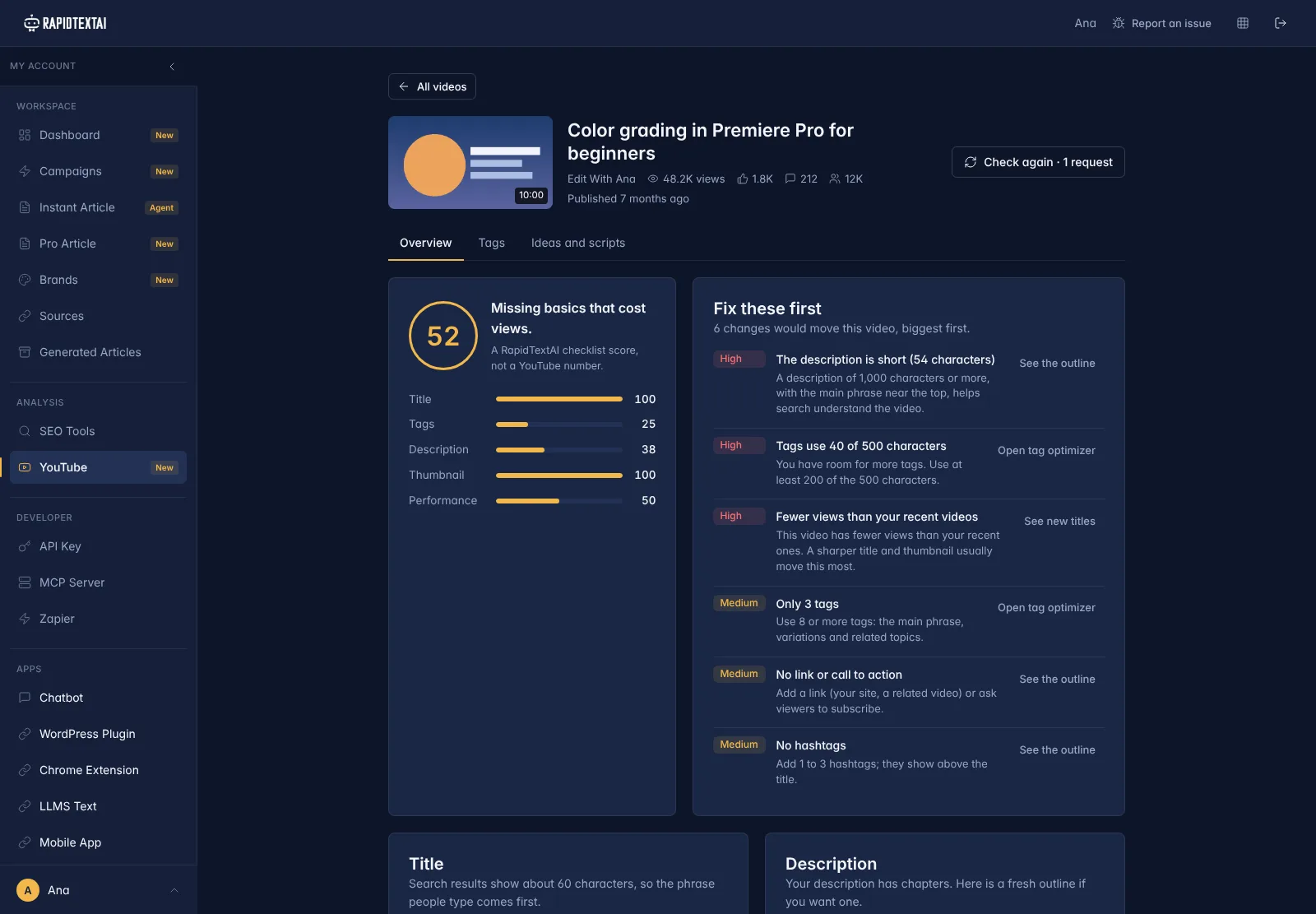
Score, tags, ideas and a script out.
Real screen from the app, shown with sample data.
What Is a YouTube Video Analysis?
Most videos lose views for small, fixable reasons: a description that says almost nothing, tags that leave most of the 500 characters unused, a title that buries the phrase people search for, no chapters. They are easy to miss when you only look at your own video.
RapidTextAI reads the public details of your video and of the videos that compete with it, then turns them into a short list of changes, biggest first. It also reads the comments on your recent videos, so the next idea comes from what your viewers are already asking.
The result lives in a YouTube section of your dashboard, next to your articles and SEO tools. Paste another link whenever you publish something new.
What You Get From One Video
Three actions, each with its own cost, shown before you run it. You choose what to run.
A score, by area
Title, tags, description, thumbnail and performance are checked against fixed rules and scored. It is a RapidTextAI checklist score, not a YouTube number, and each low score says what to change.
Fix these first
The changes are ranked high, medium and low, with a link to the part of the workspace where you make each one: the tag optimizer, new titles or the description outline.
Tags that fit
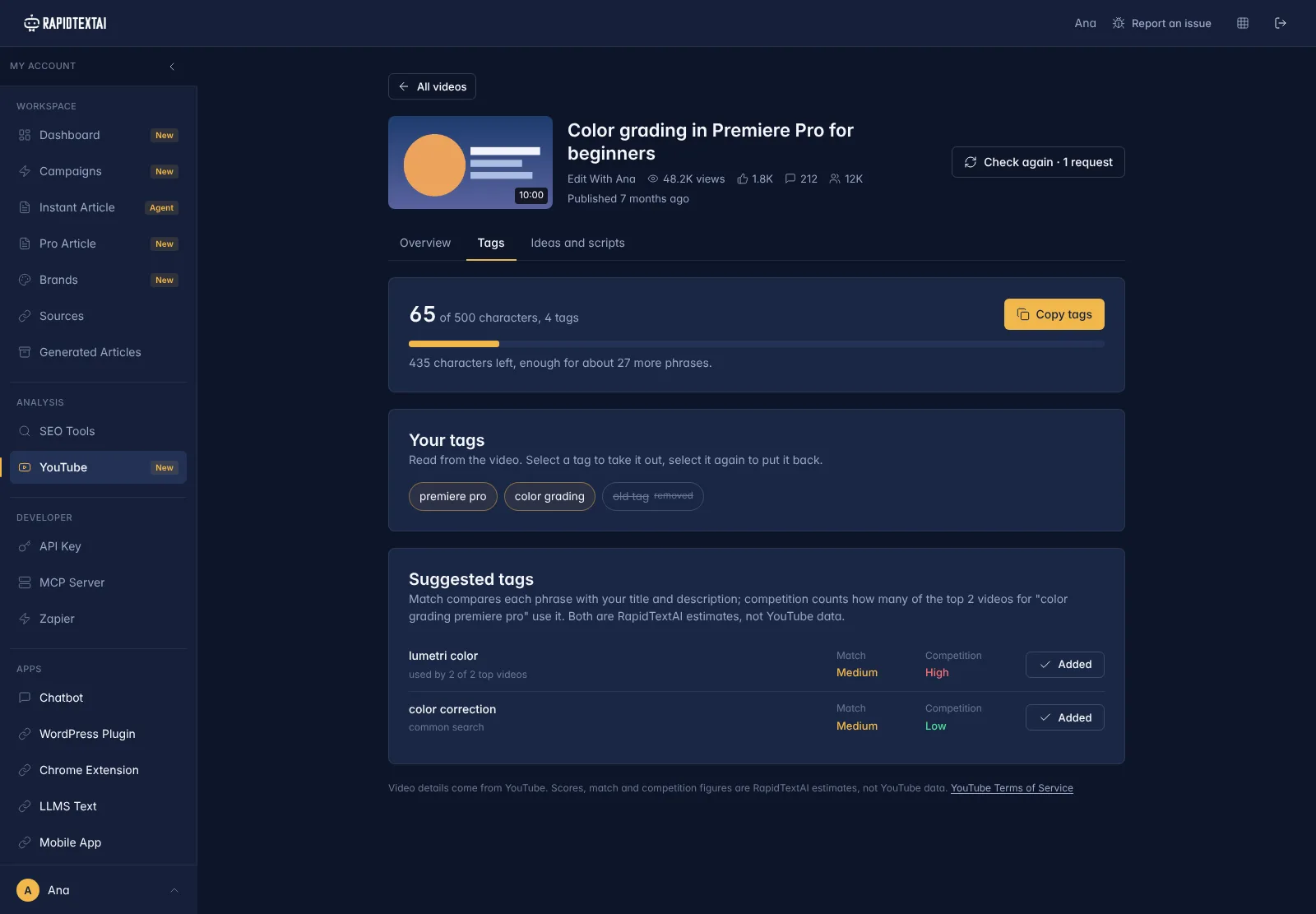
A live counter shows how many of the 500 tag characters you use. Suggested tags show a match level against your title and description and a competition level against the top videos for the topic. Both are labelled estimates.
Questions from viewers
The top comments on your recent videos are grouped into questions and requests, so you can see what people want answered.
Video ideas
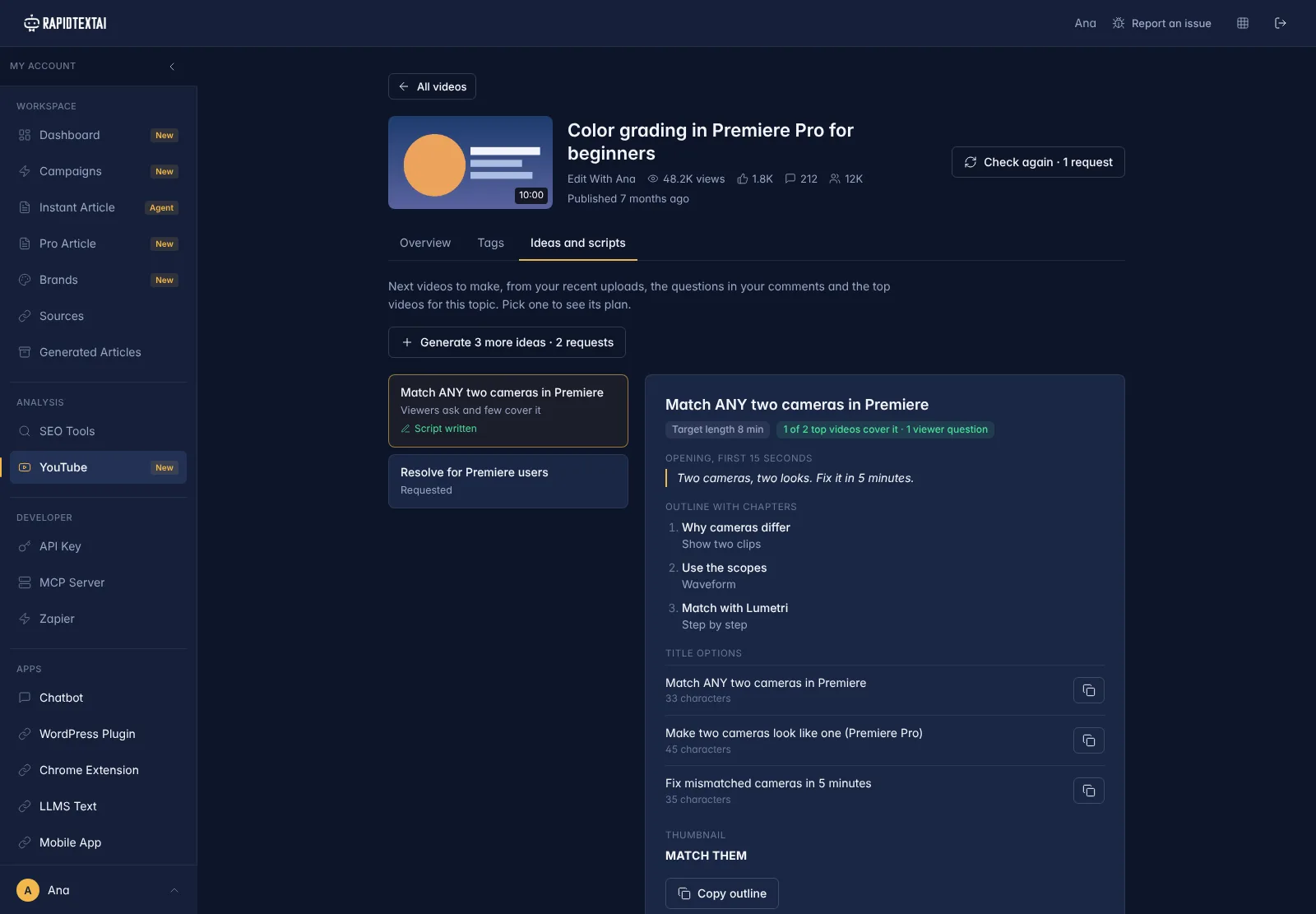
Ideas come from your recent uploads, the viewer questions and the gaps in the top videos for your topic. Each shows a target length, title options, a thumbnail idea and an outline with chapters.
A first script
Pick an idea and get a script: the opening for the first 15 seconds, then what to say and what to show, section by section.
How to Analyse a Video
It takes one link. During setup the steps run on their own and you can watch each one finish.
Paste the video link
Use the box on the home page or the YouTube section of your dashboard. Watch, short, live and youtu.be links all work. A channel or playlist link does not; paste one video.
Read the score
Open the Overview tab. The score shows the weak areas and the list of fixes, biggest first.
Improve the tags and title
On the Tags tab, take out tags that do not fit, add the suggested ones and copy the list. Pick a new title from the options.
Plan the next video
On the Ideas and scripts tab, open an idea to see its outline, then write the script for the one you want to make.
See It in the App
Screens from the live product, shown with sample data. The video and channel are fictional, so nothing here belongs to a real creator.
Who Uses It
Creators
Find out why a video is under-performing and what to fix, then plan the next one from your own comments.
Agencies and editors
Check a client video in a minute and send a clear list of changes instead of a general opinion.
Brands with a channel
Keep titles, tags and descriptions consistent across a channel and turn viewer questions into the content plan.
What to Keep in Mind
- The analysis uses public data from the YouTube Data API. Your private analytics, such as watch time, click-through rate and traffic sources, are not available to it.
- Match and competition levels, and the score, are RapidTextAI estimates. They are a guide for what to try, not a prediction of views or rankings.
- Captions are not shared by YouTube, so chapter timings are sometimes left blank for you to fill in. Comments must be turned on for the video to give viewer questions.
- To follow YouTube's rules, video details are kept for 30 days and then removed from your saved analysis. Other channels' tags are never shown, and the pages say where the data comes from.
What It Costs
An analysis costs 3 requests, a set of video ideas 2 requests and a script 3 requests. The cost is shown on each button before you run it, and a failed run is refunded. Setting up a video from the home page uses 8 of the 45 free setup requests. You can start on the free plan with no credit card.
YouTube Video Analysis FAQ
Paste the video link into the box on the RapidTextAI home page, or into the YouTube section of your dashboard. RapidTextAI reads the video, finds competing videos and shows a score, tag suggestions, ideas and a first script.
Yes. RapidTextAI reads public video data only through the YouTube Data API. It does not download videos or scrape pages.
No. It works from public data, so it cannot see watch time, click-through rate or traffic sources. Use YouTube Studio for those.
It shows what to improve and gives you tags, titles and ideas to try. It does not promise views or rankings, and the score is a RapidTextAI checklist score, not a YouTube number.
Not yet. Paste the link to a single video. Watch, short, live and youtu.be links are all supported.
No. The YouTube section is separate from articles and campaigns. It gives you a score, tags, video ideas and scripts.
Keep Exploring
Ready to see what your next video
should fix first?
Get Started Now


