
AI Content Refresh: Fix Old Posts Without Rewriting Them
Old posts lose traffic when their numbers and dates go stale. Paste the address of a post and RapidTextAI finds the outdated statistics and years, looks up current figures on the web and rewrites only those sentences, each one with its source.
- Changes only the sentences that are out of date
- Every change shown before and after, with its source
- No source found means no change
- Open the updated post straight in the editor
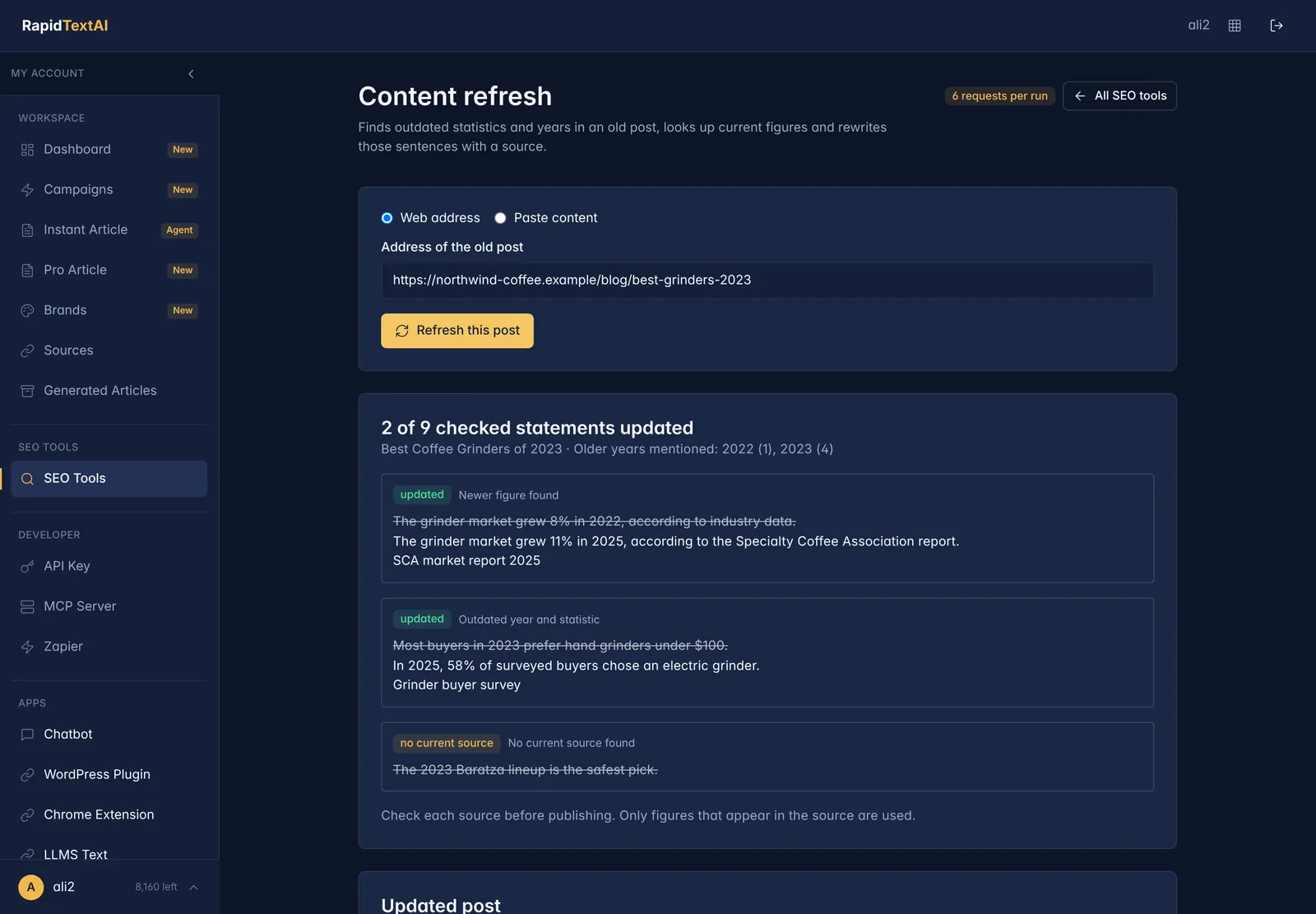
Sourced figure in.
Real screen from the app, shown with sample data.
What Is a Content Refresh?
A content refresh updates an existing article instead of publishing a new one. It is one of the cheapest ways to recover traffic, because the page already has links, history and an audience. What it needs is accurate, current information.
The slow part is finding what has aged. A statistic from two years ago, a heading with last year in it, a claim about a product that has since changed. RapidTextAI scans the post for these, searches for a current figure and rewrites the sentence around it.
Because the tool only changes what it can support, you stay in control. Sentences without a current source are left exactly as they were and flagged, so nothing is replaced with a guess.
How the Refresh Works
Finds what has aged
Statistics, years and time-sensitive claims are flagged, with a summary of how many statements were checked and which old years were found.
Looks up current figures
For each flagged sentence the tool searches the live web and reads the best matching source for a newer number.
Rewrites only that sentence
The rest of your post, including your voice and structure, stays untouched. Only the outdated sentence is replaced.
Before and after
Each change shows the original sentence struck through beside the new one, with the reason and a link to the source.
No source, no change
If no current source can be found, the sentence is marked and left alone. You decide whether to rewrite it yourself.
Ready for your CMS
Copy the updated HTML, or open it in the editor to keep polishing before you publish.
How to Refresh a Post
Paste the address or the content
Give it the web address of the old post, or paste the text or HTML directly if the page is not public.
Let it check the post
The tool reads the post, flags outdated statements and searches for current figures. Progress is shown as it works.
Review the changes
Read each before and after, open the sources you want to double-check and note any sentences that were left unchanged.
Publish the update
Copy the updated HTML into your CMS, or open it in the editor. Update the post date and resubmit the page for indexing.
Good For
Posts losing traffic
Find the articles whose year, price or statistic has drifted and bring them back in line with what is true now.
Large archives
Work through a backlog one post at a time with a consistent, reviewable result for each.
Careful editors
Every change is visible and sourced, so a reviewer can approve or reject it quickly.
Limits Worth Knowing
- It targets statistics, dates and similar time-sensitive facts. It does not restructure a post or rewrite its argument.
- Where several sources disagree, the sentence cites the one it read. Check it against what you consider authoritative.
- Pages that block automated access cannot be fetched by address. Paste the content instead.
What It Costs
A content refresh costs 6 requests from your plan, shown before you run it. Start on the free plan with no credit card.
AI Content Refresh FAQ
It finds outdated statistics and years, looks up current figures and rewrites only those sentences with a source. The rest of the post is not changed.
No. If no current source can be found for a statement, it is left unchanged and marked, so you can decide what to do.
No. You can paste the text or HTML of a draft or private post instead of a web address.
Accurate, current content tends to serve readers better, and updating a page that already has links and history is often faster than writing a new one. Results vary, and the tool does not promise ranking changes.
A full rewrite changes everything and can introduce new errors. A refresh changes only what is out of date and shows the source for each change.
Keep Exploring
Ready to bring your old
posts up to date?
Get Started Now


