Originality Checker for Drafts and AI Articles
Before you publish, find out whether any of your sentences already exist somewhere else. RapidTextAI picks distinctive sentences from your text, searches each as an exact phrase and shows you the pages where long runs of words match.
- Searches real sentences from your draft as exact phrases
- Shows the matching page and how many words in a row match
- An originality score for quick comparison
- Honest about being a spot check, not a full scan
Matching page out.
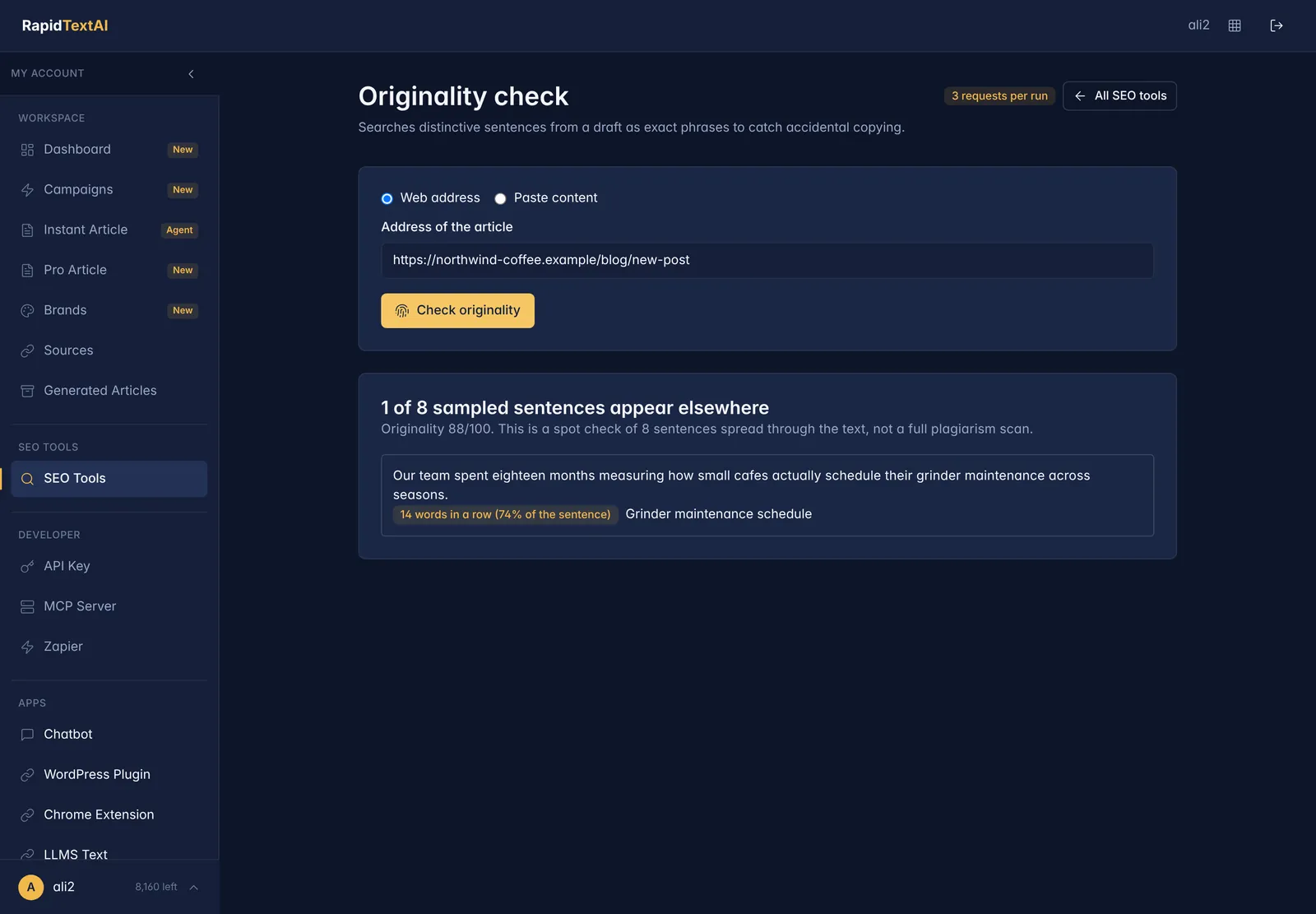
Real screen from the app, shown with sample data.
What Does an Originality Check Tell You?
Duplicate or near-duplicate text can hurt a page and embarrass a publisher. It happens by accident more than people expect: a writer paraphrases too closely, a template reuses a paragraph, or an AI draft reproduces a well-known phrasing.
RapidTextAI takes a sample of sentences from your draft that are distinctive enough to be searched, queries each as an exact phrase and checks whether other pages contain the same run of words. Matches are listed with the page, the length of the match and how much of the sentence it covers.
It is a quick spot check that takes seconds, which makes it practical to run on every article rather than only the ones you are worried about.
What the Report Shows
A score
The share of sampled sentences that did not appear elsewhere, so you can compare drafts and track edits.
The matching sentence
See exactly which sentence matched, in your own words, so you can rewrite it.
The page it matched
Open the page that contains the same words and judge whether it is a quote, a common phrase or real overlap.
How long the match is
The number of words in a row and the share of the sentence they cover. A long run is more telling than a short common phrase.
Fast
Only a handful of searches per run, so you get an answer in moments.
Plain about limits
The report says how many sentences were checked, so you know how much of the text was covered.
How to Check a Draft
Give it the text
Paste the draft or enter the web address of the page.
It samples and searches
Distinctive sentences are selected and searched as exact phrases across the web.
Review the matches
Open each matching page. Quoted material with attribution is fine. Unattributed long matches need rewriting.
Rewrite and rerun
Edit the flagged sentences in your own words and run the check again.
Good For
AI-assisted writing
A quick safeguard before you publish a generated draft.
Teams and freelancers
Check contributed articles consistently before they go live.
Content audits
Spot-check older pages for text that has been reused.
Limits Worth Knowing
- It samples sentences rather than comparing every line, so it can miss copying that falls outside the sample.
- It searches the public web. Private databases, paywalled pages and offline sources are not covered.
- Short common phrases can match many pages. Look at the match length before deciding anything.
What It Costs
An originality check costs 3 requests from your plan, shown before you run it. Start on the free plan with no credit card.
Originality Checker FAQ
No. It is a spot check that samples distinctive sentences and searches them as exact phrases. It is quick and useful, but it does not scan every sentence or private databases.
Yes. It works on any text. AI drafts sometimes reproduce familiar phrasing, so a spot check before publishing is sensible.
It reflects how many of the sampled sentences did not appear elsewhere. A high score means few matches in the sample, not that the whole article is guaranteed original.
Open the matching page. If it is a quote, add attribution. If the match is long and unattributed, rewrite the sentence in your own words.
No. This tool only looks for matching text on the web. It does not rewrite or disguise anything.
Keep Exploring
Ready to publish
with confidence?
Get Started Now


