AI Fact Checker That Quotes Its Sources
Run any article through a citation audit. RapidTextAI pulls out the factual claims, searches the web for evidence and gives each one a verdict, with the exact sentence it relied on and a link. If it cannot quote a source, the claim is marked unverified, never guessed.
- Four verdicts: supported, partly true, contradicted, unverified
- The quoted evidence and its link beside each claim
- Works on your writing and on AI drafts
- Paste the text or give the web address
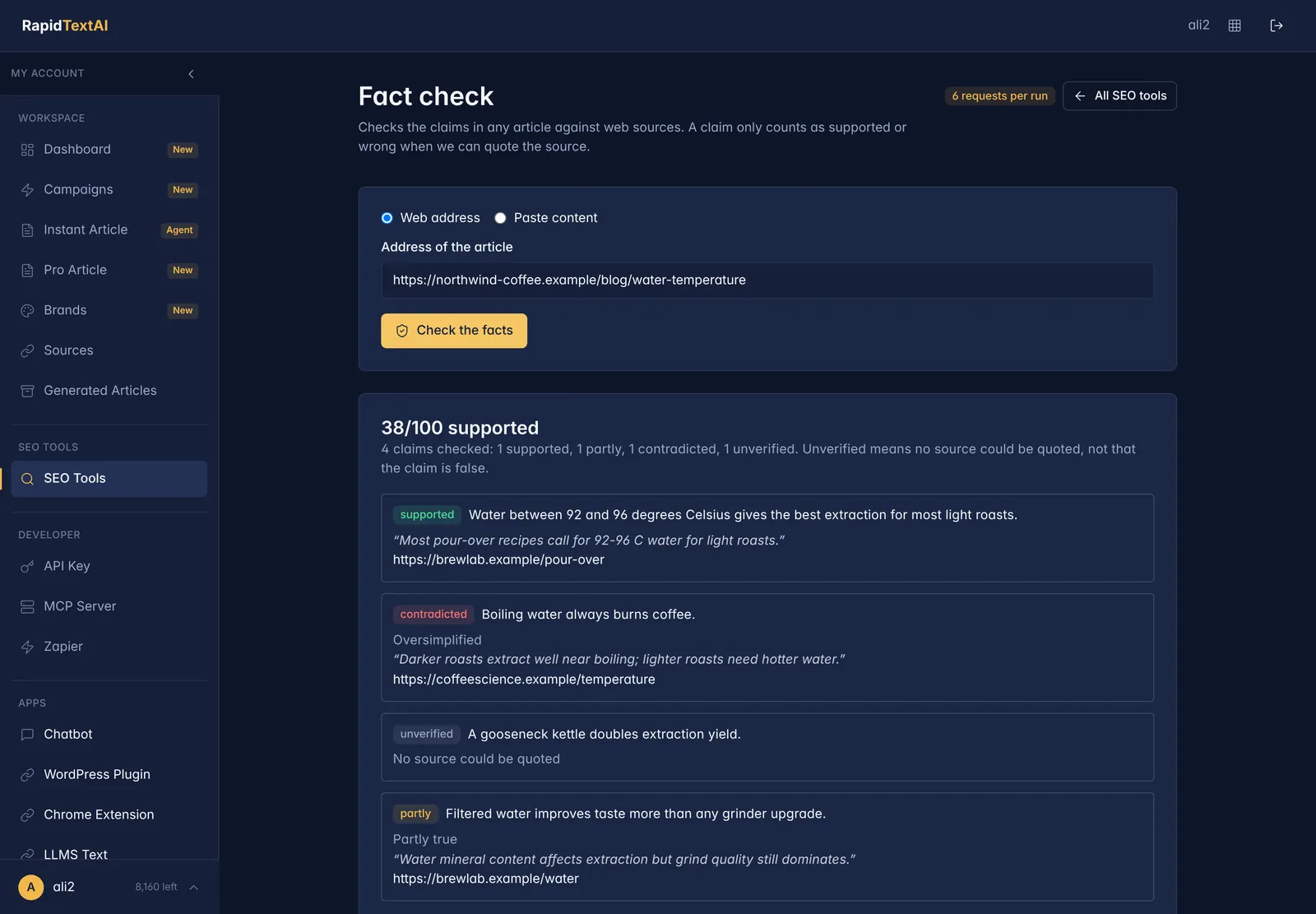
Verdict and quote out.
Real screen from the app, shown with sample data.
Why Fact-Check an Article?
Readers and search engines both reward accurate content, and a single wrong figure can undermine a whole article. AI drafts add a second risk: models can state invented details with confidence. Whoever wrote the draft, the checking still has to happen before it goes live.
Checking by hand means finding each claim, searching for it, reading the source and deciding whether it really says what the article says. RapidTextAI does the legwork: it extracts the claims, looks for evidence and shows you what it found.
The design rule is simple. A verdict of supported or contradicted needs a quote from a source. Without one, the claim is unverified. That keeps the tool honest about what it does not know.
What the Report Shows
Supported
A source says the same thing. The report shows the quoted sentence and links to the page.
Partly true
The claim is close but oversimplified or missing a condition. The report explains what differs.
Contradicted
A source says something different. You see the evidence so you can correct the sentence.
Unverified
No source could be quoted either way. These are the claims to check yourself.
An overall score
A summary of how many claims were checked and how many fell into each group, so you can compare drafts at a glance.
A link for every verdict
Open the source in one click to read it in context before you change your article.
How to Fact-Check Your Article
Give it the article
Paste the web address of a published page, or paste the text of a draft.
Let it search
The tool extracts the claims and searches the live web for evidence for each. You can watch the progress.
Read the verdicts
Start with the contradicted and partly true claims, then the unverified ones.
Fix and republish
Correct what needs it, add the sources you trust and run the check again if you changed a lot.
Who It Helps
Editors and publishers
Add a repeatable accuracy check to your review step before anything goes live.
Teams using AI drafts
Catch invented or outdated details before they reach readers.
Writers and researchers
See which claims have solid support and which need a better source.
What It Cannot Do
- It checks claims against what can be found on the open web. Subscription content and private data are out of reach.
- It is an assistant for your review, not a replacement for it. Read the sources for anything important, such as medical, legal or financial statements.
- Opinions and predictions are not facts, so they are not given verdicts.
What It Costs
A fact check costs 6 requests from your plan, shown before you run it. Start on the free plan with no credit card.
AI Fact Checker FAQ
It searches for evidence and only marks a claim supported or contradicted when it can quote a sentence from a source that says so. Without a quote, the claim is unverified.
Yes. It works on any text, whether you or an AI wrote it. It is a useful last step after generating a draft.
No. It speeds up review by finding evidence and showing it, but you should read the sources for anything that matters.
Factual statements such as figures, dates, names and cause-and-effect claims. Opinions and predictions are not given verdicts.
Pro Article researches the live web and runs its own quality checks, including one that every figure appears in its sources. The fact checker is an independent audit you can run on any article, including those.
Keep Exploring
Ready to check
what you publish?
Get Started Now


